Cybersecurity: 15 points to consider for your WordPress site
Hackers are more active than ever in trying to take control of your website. Attacks on all types of sites have increased drastically in the last 2 years. For this reason, it is important to act preventively to minimize risks.
We have compiled a list of 15 points to validate. Even though the majority of these points are simple to implement, few companies do everything necessary to avoid being hacked.
Here is your chance: don’t become a statistic!
1. Backups
First of all, do you have a backup copy of your website?
Many companies rely on their web host and this is a mistake. To be effective, your backups should:
- be automated (one backup per day, at minimum)
- be stored on a remote server (so not on the same server as your website)
- be tested (a partial or corrupted backup is useless)
If you only remember one thing from this article, we strongly recommend it be this point (… or the bonus!).
2. Updates
Being lazy, hackers generally target sites that are not up to date. The reason: updates very often fix security vulnerabilities. By not applying available updates, vulnerabilities leave you exposed!
In the WordPress universe, you will have to update WordPress, your themes, and your plugins. Warning! There is a way to proceed to be effective and reduce the risk of breakage.
3. Passwords
Is the password you use to log into your Dashboard unique?
Unique as in “this password is not used for any other service.” Reusing the same password in various places can be a problem.
Furthermore, is your password complex enough? Have you put it in a password manager?
Learn more about How to create a good password.
4. Users
How many administrators are there on your site?
The “Administrator” right (or “super admin” in a site network) is the ultimate right in the WordPress universe. With this role, you can do EVERYTHING.
Do you have users who don’t really need to be able to delete features or change your site’s theme? This is an excellent opportunity to reduce their access. You could consider the “Editor” role for users who only modify content.
Users and their rights must be reviewed regularly. It would be a shame if a former member of your team had access to your data (and that of your clients).
And regarding your access, never share it with another user! It is possible to create as many accesses as there are members in your team.
5. SSL Certificate
An SSL certificate allows you to encrypt exchanges between your visitors and your server via the HTTPS protocol. Thus, security is increased when your visitors buy on your website or fill out a form, for example.
For several years, Google has been penalizing web pages not using the HTTPS protocol by lowering their rank in search results.
The HTTPS protocol is also required to use the HTTP2 (or HTTP3) protocol which allows for better management of your visitors’ requests while increasing the speed of data exchanges. Oh! Your website’s speed is also one of the criteria used for your pages’ rank in search engines!
6. Unused Elements
Anything present on your site that is not actually used can be a risk. Not necessarily “everything,” but this is the case for themes and plugins that are installed but not activated.
If a theme (or a plugin) is installed but not activated… it is not required. However, it can be used as a vector in an attack if it is vulnerable. If it’s not used, you should consider simply removing the element in question.
7. Code Editors
WordPress provides two types of code editors right within its Dashboard:
- Theme File Editor
- Plugin File Editor
These editors allow you to modify all files related to installed themes and plugins. A single mistake during a modification and… hop! nothing loads anymore.
Code modifications should never be performed in production (your site accessible to visitors). There is therefore no reason to keep these editors… unless you like the thrills that could come with taking such a risk!
In your theme’s functions.php file, you can add the following line:
define( 'DISALLOW_FILE_MODS', true );By adding the following line, the two code editors will disappear from under the “Appearance” and “Plugins” menus of your Dashboard.
8. File Permissions
File permissions can be complex to understand. That said, when permissions problems are encountered, it is not uncommon to find that a novice has modified the permissions to remove all restrictions.
This could have the impact of allowing another client of the same host to view your site’s files, or even modify them.
In the WordPress universe, files should generally use the permissions: 644. For directories, we use: 755.
If the subject interests you, the following article might be relevant:
Changing file permissions
9. Reliable Sources
To add functionality to a WordPress site in the form of themes or plugins, it is possible to acquire them from different sources… but not all are equal in terms of reliability and security!
WordPress offers nearly 60,000 themes and plugins for free download on their official website. For a reliable choice, it is important to check the number of active installations, the number of stars awarded, and if users get answers to their technical support questions.
For themes and plugins that require payment, it is recommended to buy them directly from the developer’s site or from reputable sites such as ThemeForest and CodeCanyon.
10. Security Plugins
Using a security plugin is not always required, but it is often a simple and quick way to establish an additional line of defense when you don’t control all aspects of your website.
Although there are dozens of WordPress plugins promoting security, some of them seem more complete to us and benefit from frequent updates allowing for quick reactions to threats:
11. Double Verification
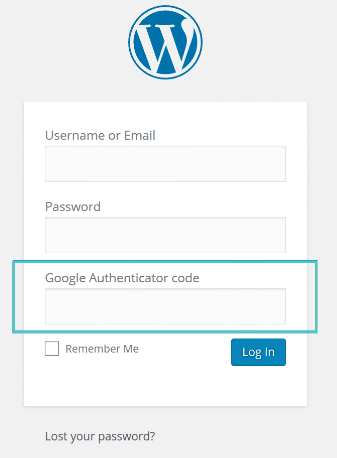
With the rise of intrusion attempts, using a strong password is often no longer sufficient.
We now speak of two-factor authentication (2FA) or multi-factor authentication. This involves cross-verification by sending additional codes via email, SMS, or a mobile phone application, before being able to access your Dashboard.
WordPress allows the addition of this type of authentication using certain security plugins or other mechanisms that will discourage intrusion attempts.
12. Availability (Monitoring)
How do you know that your web hosting is functional at all times?
This is what monitoring services answer: they send a request to your site at regular intervals, typically called a ping, and if the site does not respond quickly enough, then the service notifies you and tries to give you the reason for the problem.
You can then
Here are some examples of such services offering different levels of detail and notifications:
13. Firewall
The purpose of a firewall is to protect your website from potentially dangerous requests, whether they are intrusion attempts or attacks aimed at making your site unavailable to your visitors.
There are several types of firewalls, whether at the level of your domain name (e.g., Cloudflare), your web host, your hosting server, or even your website using a plugin.
A myth suggests that going through a firewall slows down access to a site, but in fact, because the firewall stops a host of useless requests on a website, the opposite happens: the website being less solicited, it can respond more quickly to visitors!
14. Quality Hosting
The place where your website will be hosted (files and database) counts for a lot in its performance, both for you who will enter content and for your visitors.
There are different types of web hosting that vary in quality, level of complexity, and naturally, in price, ranging from a few dollars per month to several thousand dollars.
Let’s say that at a price of less than $10 per month, don’t expect record-breaking performance. And regardless of your choice, test the technical support, because in case of a problem, you’ll know what to expect!
As a general rule, it is recommended to put only one website (or application) in a web hosting account, in order to minimize the risk in case of vulnerability, with the aim of minimizing the possibility of cross-contamination.
15. Popular Tools
On the web, it pays to use the most well-known tools because they are often updated more frequently, thus offering secure operation and new features.
The presence of documentation for the tools you choose is often a guarantee of superior quality. Finally, if you discover that your favorite tool hasn’t had updates for more than a year, start considering changing it, with the transition that this will involve. Otherwise, beware of unknown vulnerabilities!
Bonus
Regarding your domain name:
- It must belong to you (e.g., it is not purchased in the name of an agency)
- You must have full administrative access (management and billing)
- Auto-renewal must be activated
- Your account email address must be valid
- The credit card on the account must be valid
Conclusion
Cybersecurity is a science and an art: technical knowledge is nothing without an understanding of the “human factor” and the unforeseeable. Your cybersecurity strategy will only be as strong as its weakest link.
Complete and tested backups can save a website, despite the presence of gaps in your security strategy.
Hacking is expensive: in money, time, reputation, missed opportunities… practice cyber-resilience to prevent the worst!
Worried about your website’s cybersecurity? Contact our WordPress expert agency.